Contact Facets
Not to be confused with goal facets or search facets, a contact facet is a property of a contact - such their first name, e-mail address, or job title. You can easily add your own facets.
Configuring Facets
Facets are configured in Sitecore.Analytics.Model.config. There are no corresponding items in Sitecore - it’s all done in configuration. The configuration file contains two main sections:
- A list of elements. This section maps an interface to a concrete implementation - for instance, the concrete implementation of
Sitecore.Analytics.Model.Entities.IContactEmailAddressesis, by default,Sitecore.Analytics.Model.Generated.ContactEmailAddresses. -
An entity definition section that defines the structure of the contact model, including a list of facets and their names. This is the default list:
<entities>
  <contact>
    <factory type="Sitecore.Analytics.Data.ContactFactory, Sitecore.Analytics" singleInstance="true" />
    <template type="Sitecore.Analytics.Data.ContactTemplateFactory, Sitecore.Analytics" singleInstance="true" />
    <facets>
      <facet name="Personal" contract="Sitecore.Analytics.Model.Entities.IContactPersonalInfo, Sitecore.Analytics.Model" />
      <facet name="Addresses" contract="Sitecore.Analytics.Model.Entities.IContactAddresses, Sitecore.Analytics.Model" />
      <facet name="Emails" contract="Sitecore.Analytics.Model.Entities.IContactEmailAddresses, Sitecore.Analytics.Model" />
      <facet name="Phone Numbers" contract="Sitecore.Analytics.Model.Entities.IContactPhoneNumbers, Sitecore.Analytics.Model" />
      <facet name="Picture" contract="Sitecore.Analytics.Model.Entities.IContactPicture, Sitecore.Analytics.Model" />
      <facet name="Communication Profile" contract="Sitecore.Analytics.Model.Entities.IContactCommunicationProfile, Sitecore.Analytics.Model" />
      <facet name="Preferences" contract="Sitecore.Analytics.Model.Entities.IContactPreferences, Sitecore.Analytics.Model" />
    </facets>
  </contact>
</entities>
Retrieving Facets
Once a facet has been set up, you can retrieve it by name using the contact API:
var contact = Tracker.Current.Contact;
var emailAddresses = contact.GetFacet<IContactEmailAddresses>("Personal");
In this particular case, you will get an IContactEmailAddress object back with a list of email addresses, and the name of the preferred e-mail address (such as work, home, etc):
public interface IContactEmailAddresses : IFacet, IElement, IValidatable
{
IElementDictionary
string Preferred { get; set; } }
Default Facets
Email Address
It is possible to add any number of e-mail addresses to a contact. In MongoDB, the structure for e-mail addresses looks like this per contact:
"Emails" : {
    "Preferred" : "Home E-Mail",
    "Entries" : {
        "Work E-Mail" : {
            "SmtpAddress" : "toby-work@email.com"
        },
        "Home E-Mail" : {
            "SmtpAddress" : "toby-home@email.com"
        }
    }
}
When this data is retrieved using the API, each one becomes an IEmailAddress in the Entries list, and the *title of the contact’s preferred e-mail address gets mapped to Preferred - not the e-mail address itself!
public interface IContactEmailAddresses : IFacet, IElement, IValidatable
{
IElementDictionary
string Preferred { get; set; } }
Each IEmailAddress has an SmtpAddress, and also a BounceCount integer where relevant. Note that there is no ‘E-Mail Name’ anywhere; the Entries property on IContactEmailAddresses is a dictionary, and the e-mail names are the keys.
public interface IEmailAddress : IElement, IValidatable { string SmtpAddress { get; set; }
int BounceCount { get; set; } }
A note about preferred e-mail address
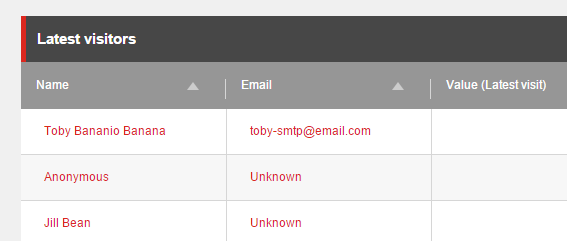
A visitor’s preferred e-mail address is the one that is displayed in the Experience Profile search interface - if you do not specify a preference, it will display ‘Unknown’:
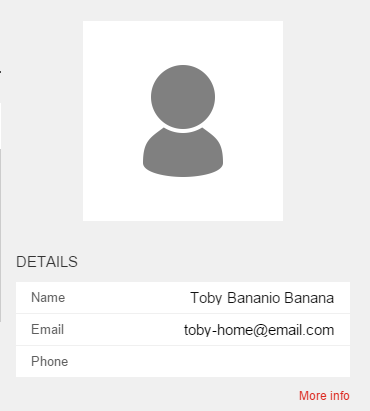
It also displays in the Experience Profile itself:
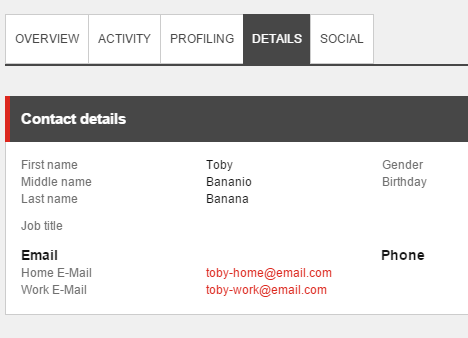
All available e-mail addresses are listed (with their keys) in the Details tab: